Discord phone verification: accepted numbers and fixes
Learn which numbers Discord accepts, how server verification levels work, why verification fails, and when temporary numbers are unsuitable.
A phone number for Discord verification must be a valid mobile number that Discord accepts and that is not already attached to another Discord account. If a server requires a verified phone, check its verification level; if Discord rejects your number or no SMS arrives, diagnose that specific failure before trying again.
Discord's phone-error guide excludes VoIP and landline numbers. Buying a number labeled virtual or non-VoIP does not establish eligibility. For a Discord account you intend to keep, our recommendation is a mobile line you control over time, because a temporary SMS number cannot provide future access.
Quick summary
- Server asks for a phone: identify the server's verification requirement first.
- Number rejected: check the country, format, line type and existing account association.
- Recently used or rate limited: stop retrying and follow Discord's waiting guidance.
- Code missing: check the receiving line and preserve the error details for support.
- Account matters long term: use a number you maintain, rather than a temporary inbox.
Why Discord asks for phone verification
There are two different prompts to recognize. A server can set a verification level for participation. Separately, Discord can require account verification as a platform safety check. Seeing one does not tell you that the other has been satisfied.
Discord's account-verification guide describes checks triggered by activity such as joining many servers quickly or messaging multiple people who are not friends. Those examples explain why a request can appear after registration. They do not reveal exactly why your account was selected.
The phone flow has an eligibility stage and a delivery stage. Treat an immediate rejection as a different problem from reaching the code screen and receiving nothing. That distinction determines whether your next check belongs in Discord's number field or in the SMS inbox.

Server verification also affects voice participation. Discord's verification-level documentation says users who fail the requirements cannot send channel messages or join voice channels. Its FAQ says a verified phone supersedes the email and time requirements within this verification-level system. Other server permissions still need separate attention.
Why Discord phone verification may fail
The following order is a practical troubleshooting sequence, not a measured ranking of how often each cause occurs.
1. The number has the wrong format or line type
Check the selected country against the actual number. Do not infer eligibility from an area code, a flag or the ability to receive a friend's text. A reachable number can still be unsuitable for this verification.
Read what a non-VoIP number means before paying for that label. Line classification, exclusive access and length of ownership answer different questions. We have no evidence identifying which lookup system Discord uses, so a lookup result should not be presented as Discord's approval.
2. The number belongs to another Discord account
A recycled number can create an association problem even when you entered every digit correctly. Do not assume the unfamiliar account is yours or try to enter it. Preserve the error and use Discord support; use the official removal procedure only for an account you legitimately control.
3. Discord has temporarily limited verification attempts
Discord's verification guide recommends waiting 24–48 hours for its rate-limit/recently-used error. That guidance is not an SMS delivery estimate or a promise that every restriction ends at a particular minute. Repeated purchases are a poor way to diagnose a waiting period.
4. The SMS has not reached the receiving inbox
If you reached the code-entry stage, record when you requested the message. Our suggested checks are the destination shown, mobile service, blocked-message folders and whether the line receives ordinary texts. An ordinary text arriving is useful evidence for support; it does not prove Discord sent its message or that the route is working.
5. You are looking for a different kind of code
A login authenticator code comes from the authenticator you enrolled. A phone-verification code arrives by SMS. Discord's authenticator documentation explains this separate login protection and backup codes. Identify the prompt before changing a phone number: replacing the destination cannot recreate a lost authenticator secret.
Discord verification rules and waiting periods
Use this reference to interpret the current prompt. It combines Discord's phone-error rules, verification flow and server levels.
| Check | Published rule | Detail |
|---|---|---|
| Number association | One account at a time | One number per account; an existing association must be resolved. |
| Unsupported numbers | VoIP, burner and landline excluded | The verification guide explicitly lists these categories. |
| Recently used / rate limit | Wait 24–48 hours | This applies to the named error, not ordinary delivery. |
| Low server level | Verified email | This level does not itself require a phone. |
| High server level | Verified email, registered over 5 minutes, server presence over 10 minutes | These are participation checks, not SMS expiry times. |
| Highest server level | Verified phone required | The same page says a verified phone supersedes the other level requirements. |
The server-level page lists five levels, including None and Medium. The table focuses on decision points relevant to a phone request. Ask the administrator which level applies instead of assuming every locked channel has the same cause.
How to verify your Discord phone number step by step
Step 1. Identify the prompt
Read the complete message in the official Discord app or website. Note whether you can use the rest of the account, whether the restriction concerns one server and whether the screen requests a phone or an authenticator code. Keep a private record of the error wording.
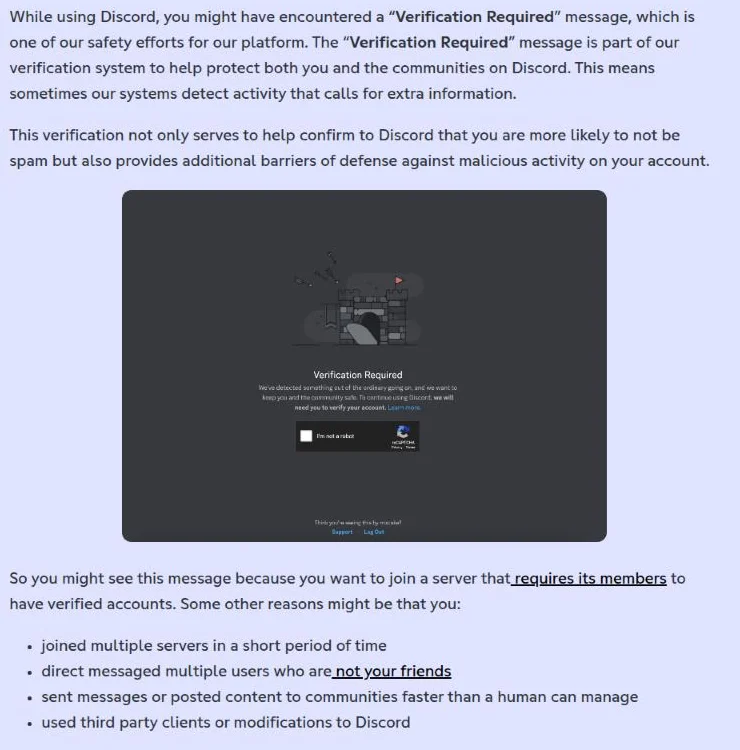 Discord Support, “How to Verify Your Discord Account,” captured November 3, 2026.
The official example above is useful for recognizing an account safety check. If your screen instead concerns access to one community, continue with the server requirement.
Step 2. Check the server level
Ask an administrator to confirm the level; ordinary members may not have access to its settings. Discord documents Server Settings → Safety Setup → Verification Level for Friend Servers on desktop/browser. Community Servers use Safety Setup → DM and Spam Protection. Read the setting before diagnosing an SMS failure.
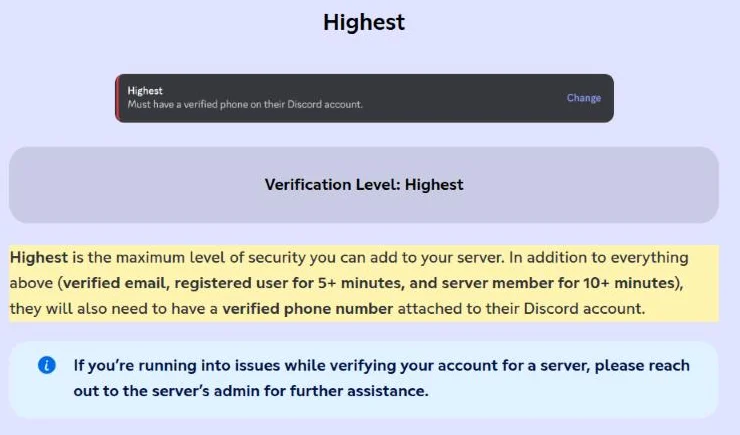 Discord Support, “Verification Levels,” captured November 3, 2026. Yellow highlight added by Ativa SMS.
The selector above explains the server's requirement. It does not show whether your particular number qualifies or whether an SMS has been sent.
Step 3. Check the number
Compare the country selection and digits with your line's details. Confirm that you can receive SMS and that the number is yours to use. If it is attached to another account you own, read Discord's number-removal instructions before changing it. Removal has a waiting period; it is not an instant transfer method.
Step 4. Request the SMS
Use the verification action in Discord, then check the receiving inbox. Reserving a number elsewhere does not itself ask Discord to send a message. Keep the request time and any displayed waiting instruction; avoid guessing codes or opening multiple parallel attempts.
Step 5. Enter the code
Enter it only in the official verification flow you started. Do not send the code to someone claiming to be a moderator or a friend. If the next screen reports another problem, preserve that message: arrival of a code and completion of verification are separate observations.
Step 6. Escalate the failure
Use Discord support when the documented checks do not resolve the error. Include the wording, time, device and whether ordinary SMS works. Mask screenshots shared publicly. Discord's error-message guide also points to its status page for checking broader incidents.
Diagnose the symptom before trying another number
This matrix gives a next action, not a definitive finding about your account.
| Symptom | Possible cause | What to check | Next action |
|---|---|---|---|
| Immediate invalid-number error | Format or ineligible line | Country and line details | Correct the entry; contact support if valid. |
| Already associated | Another account holds the number | Accounts you legitimately own | Follow removal guidance or contact support. |
| Recently used / rate limit | Temporary restriction | Exact message and last attempt | Follow the 24–48-hour guidance. |
| Code screen, no SMS | Delivery or inbox issue | Destination, filters, ordinary SMS | Record checks and escalate. |
| You can’t participate in one server | Verification or permissions | Server level with its admin | Resolve that requirement. |
| Login asks for authenticator code | MFA login challenge | Enrolled app and saved backups | Follow the MFA recovery guidance. |
Tell support whether Discord initially accepted your number, the SMS did not arrive, or an error appeared after you entered the code. Calling all three “SMS not working” loses the distinction that could resolve the case.
Your own mobile number, an eSIM, a public SMS inbox, or a temporary number?
For an account you value, continued control matters more than the initial price. These are our selection criteria, not a list of number types guaranteed to pass Discord.
| Option | Access and duration | Discord limitation | Practical fit |
|---|---|---|---|
| Existing mobile line | Private access while you maintain it | Still subject to checks | First option for lasting use; no extra line purchase. |
| Second mobile SIM or eSIM | Depends on the mobile plan | Confirm SMS capability | Separate number you can retain. |
| VoIP / second-number app | Depends on the service | VoIP excluded | Not a suitable workaround. |
| Landline | Fixed-line access | Landlines excluded | Not a verification alternative. |
| Free public SMS inbox | Messages visible to visitors | No eligibility assurance | Avoid for account verification. |
| Ativa SMS | Paid, exclusive temporary reservation | Discord can reject it | Limited SMS use only where permitted and eligible. |
An eSIM describes how a plan is installed. Before buying, ask whether it includes an SMS-capable mobile number you can keep. A data-only travel plan does not supply the receiving line this task needs.
Our public-inbox investigation documents exposed verification and recovery messages. A free inbox can hide your personal number while exposing the secret sent to its replacement. Paying removes neither Discord's eligibility checks nor the need to plan for future access.
| Your situation | Better choice | Why |
|---|---|---|
| Main Discord account | Mobile line you retain | You can receive future messages. |
| A separate account you plan to keep | Your own SMS-capable second line | Separation without a short expiry. |
| Existing-number association error | Official account/support process | Shopping does not resolve ownership. |
| Temporary permitted test | Check eligibility and limits first | A short reservation may still be rejected. |

What changes by country, device and account purpose?
US readers and people abroad
A US country code does not establish that a number is mobile or eligible. If you already have a line, ask its carrier about receiving verification messages while abroad before replacing it. Our guide to US numbers abroad separates roaming, travel connectivity and temporary inbox access.
Android, iPhone and desktop
Receiving the SMS and entering it in Discord need not happen on the same screen. If you use Discord on a computer, check the mobile line's inbox. For server administrators, Discord's documented mobile path is Server Settings → Moderation; the desktop paths appear in Step 2. Switching interfaces should help you find a setting, not be treated as a cure for number eligibility.
Community owners and teams
Explain which requirement applies before sending members through repeated verification attempts. A team should plan who maintains its account's receiving line when a staff member leaves. Our recommendation is to keep that responsibility explicit instead of making an expiring number part of a durable access process.
Our recorded Discord test: what it proves
Ativa SMS's internal test log records a successful Discord verification using a Brazilian number on September 28, 2026. The tester received the SMS, entered the code successfully and closed the activation. This is a historical observation, not a new test performed for this article.
A separate webhook test that day recorded SMS receipt at 07:45:38 UTC, or 04:45:38 BRT, followed by storage on our test site 3.5 seconds later, with the receiving page closed. That interval measures receipt-to-storage. The log does not give the full request-to-SMS duration, so it cannot support a claim that Discord delivered a code in 3.5 seconds.
The same dated log also records another Discord attempt affected by account rate limiting. Together, these observations show why a completed example does not establish that the next number will work. We publish no current delivery percentage, country recommendation or guaranteed completion time from these tests.
When not to use a temporary number
Do not use an expiring reservation for your everyday Discord account, bank, government services, main email or another account you need to recover later. A temporary SMS inbox cannot replace access to the original line after it expires. Read Ativa SMS's terms for the service limits and permitted use.
Do not buy a number to take over an unfamiliar account, evade a restriction or defeat a server's safety requirement. If Discord demands a kind of number the option cannot provide, stop. A refund policy is not permission to ignore the app's rules.
For ongoing Discord use, add appropriate account security while you still have access. Discord's authenticator guide explains storing backup codes safely. An authenticator adds protection, but it should not be sold as a guarantee that Discord will never ask for phone verification again.
How Ativa SMS helps, and its limits for Discord
Ativa SMS is a paid service for receiving SMS only. A number is reserved exclusively for up to 20 minutes, depending on the option; the exact deadline appears before purchase. It cannot receive calls, email or codes delivered inside another app. It provides no lasting number ownership or account recovery.
Discord appears in our catalog, but its published exclusions still apply, including its burner-number rule. Catalog inclusion and the historical test above do not certify any current option as eligible. We do not recommend a temporary number for a Discord account you plan to keep.
If no SMS arrives before the reservation expires, the activation amount is returned to your Ativa SMS balance automatically. Once the code arrives, there is no refund, including when Discord rejects the code or the account later encounters a restriction. A balance return is different from a promise of successful verification.
For a permitted, eligible one-time SMS task whose limits fit your needs, review the number list and current prices. The country and price appear before purchase; availability can change. Read the app's requirement before reserving anything.
Checklist before another Discord verification attempt
- Identify whether the prompt concerns a server, account verification or MFA login.
- Record the exact error and the time of your last attempt.
- Confirm country, number format and access to the receiving line.
- Check for a known association with another account you control.
- Respect any waiting instruction before requesting another SMS.
- Keep codes private and enter them only in your official Discord flow.
- Escalate persistent errors with the observations you collected.
- Choose a line you can maintain if the account needs to last.
Frequently asked questions
Why isn’t Discord phone verification working?
First separate an immediate number rejection from a missing SMS or a recently-used error. Check the country and receiving line, then follow the relevant support instructions rather than repeatedly requesting codes.
Can I use a temporary phone number for Discord verification?
Discord's verification guide excludes burner, VoIP and landline numbers, so a temporary-number listing is not proof of eligibility. For an account you intend to retain, our recommendation is your own mobile line that remains under your control.
Is there a free phone number for Discord verification?
A public free inbox provides no private control of the messages shown to visitors. Use an existing eligible mobile line if you have one; do not treat a shared inbox as a safe substitute.
Can I use a virtual number for Discord verification?
The label virtual does not tell you whether Discord will accept the line. Ask what access and number type the service actually provides, and check those details against Discord's rules before spending money.
What mobile number should I use for Discord verification?
Choose a mobile number you legitimately control and expect to maintain. Receiving today's SMS is only one consideration; consider how you would handle a future verification request too.
Can Discord send a verification code by phone call?
Discord's documented phone-verification flow uses SMS; the cited guide does not offer a voice-call alternative. Follow the options in your official prompt, and remember that Ativa SMS cannot receive calls.
Should I use a friend's Discord verification code?
Do not exchange verification codes with a friend or someone claiming to help you. A code belongs in the official verification flow started by the account holder; asking someone else to relay one creates an avoidable access risk.
Sources
All accessed on November 3, 2026.
- Discord: How to Verify Your Discord Account, safety checks, SMS flow, excluded number types and recently-used guidance.
- Discord: How to Fix Phone Errors on Discord, line format and account association.
- Discord: Verification Levels, participation requirements, settings and verified-phone precedence.
- Discord: How to Remove a Phone Number From a Discord Account, legitimate number removal and the subsequent waiting period.
- Discord: Using an Authenticator App on Discord, login codes and backups.
- Discord: Discord Error Message Guide, error-specific support and incident checks.
- Ativa SMS: internal test log dated September 28, 2026, reviewed November 3, 2026; historical successful verification and webhook timing. No new live delivery test was performed for this article.
- Ativa SMS: public-inbox investigation and terms of use. The investigation's original observation date is October 4, 2026.


