Get SMS verification codes in Telegram: how our bot works
Buy a number, receive the code and close it out without leaving Telegram. See how the bot works behind the scenes, how to connect it, and how to keep codes off your lock screen.
If you buy a temporary number on your phone, you know the routine: open the app that asks for a code, type the number, switch back to the browser and keep refreshing until the SMS shows up. If the tab reloads or the screen locks, you start waiting all over again.
The Ativa SMS bot on Telegram, @ativa_sms_bot, removes that back-and-forth. You buy the number, receive the code and mark it as used, all inside a chat that is already open on your phone. This post walks through the whole flow with real screenshots and explains what happens between the SMS arriving and the message appearing on your screen.
How the code reaches Telegram
There are four steps, and only the first one is up to you.

- You buy the number, on the website or in the bot itself.
- The app sends the SMS to that number.
- Ativa SMS receives the SMS and immediately queues a notice for every Telegram account connected to your Ativa SMS account.
- The bot delivers the message with the code, the app, the country and the number.
The queue makes sure the notice is not lost. If Telegram does not answer on the first try, the system tries again after 1, 2, 4 and 8 minutes, for a total of five attempts. Telegram also sets a pace: its bot documentation asks developers to avoid sending more than one message per second in the same chat, so notices that arrive together go out in sequence.
In our test on October 12, 2026, with a Shopee number in Brazil, the code showed up in Telegram 1.8 seconds after the SMS reached the number. That time depends on your phone's connection and on Telegram, so it is not a guarantee, but it shows the scale: seconds, not minutes.
One detail: notices cover numbers bought on the website or in the bot. Resellers who use our API get their notices through their own webhook, not through the bot.
How to connect your account
You need an Ativa SMS account. If you don't have one yet, sign up; it takes a minute.
- In the dashboard, open Notices and, under Telegram notifications, tap Connect Telegram.
- Telegram opens a chat with @ativa_sms_bot. Tap Start. The connection link is valid for 10 minutes and works only once.
- The bot confirms with your masked email, and you get an email saying a Telegram account was connected. If it wasn't you, disconnect it in the dashboard and change your password.
Each account accepts up to 3 Telegram accounts, for example yours and a business partner's. The bot only works in private chats: it doesn't join groups, so your code never lands in a chat with other people.
After connecting, send /start to see the welcome message and the menu.
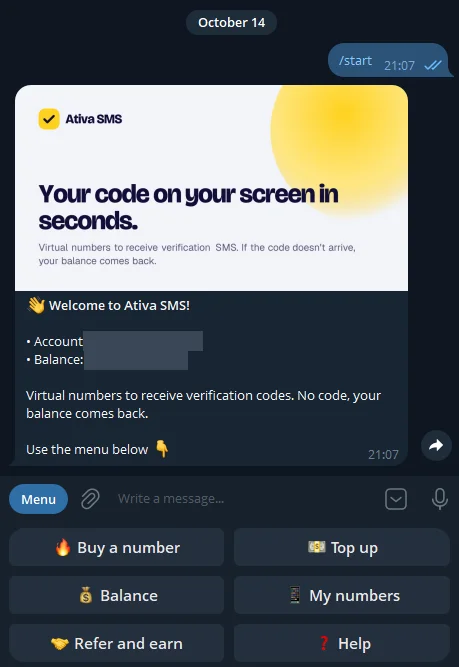 The @ativa_sms_bot welcome message. Screenshot from October 14, 2026; email and balance covered.
What you can do in the bot
Buy a number
Tap Buy a number. The bot lists the most requested apps with a starting price in your account currency. If the app you need isn't there, type its name in the chat.
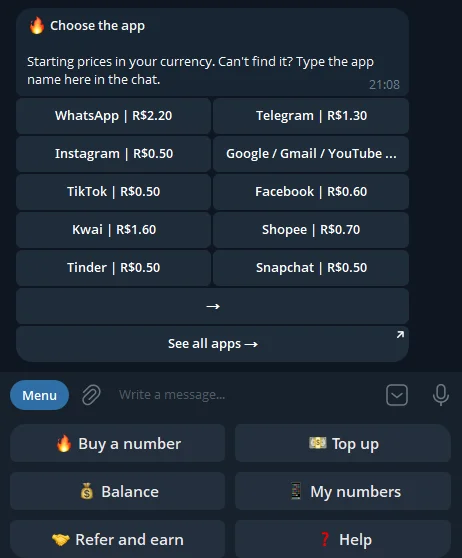 Choosing the app. This account uses Brazilian reais; dollar accounts see prices in dollars.
Next comes the country, each one with its price at that moment.
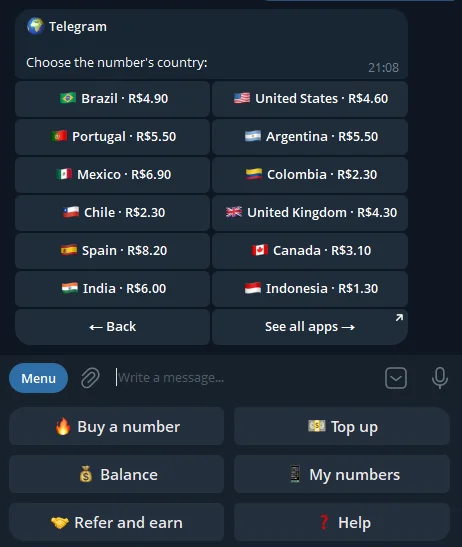 Countries for a Telegram number, each with its price.
Then the purchase options. The bot sums up the rule in one line: you only pay if the code arrives. No code in time, and your balance comes back.
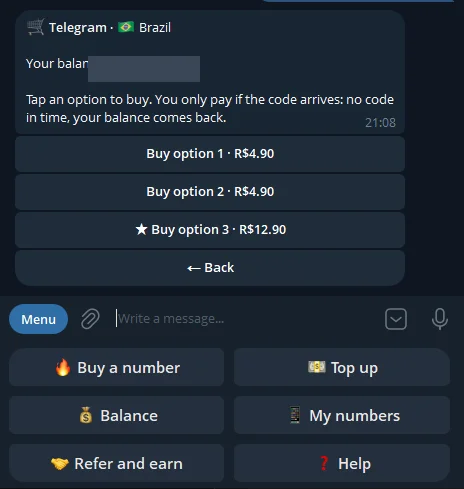 Purchase options, each with its own price. Balance covered.
Follow the number and the code
Once the number is bought, the bot shows it with the deadline for the code and three buttons: Copy number, Cancel and refund and Open on the website. Each number's time limit depends on the option you pick and is shown before you buy.
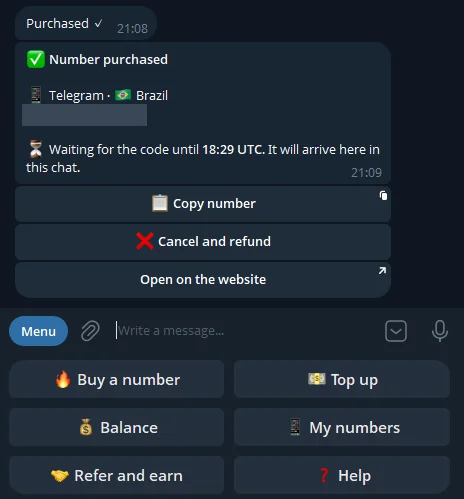 A number bought in the bot. Phone number covered.
When the SMS arrives, the code message comes with a Copy code button. It relies on a feature Telegram added for bots in Bot API 7.11, released on October 31, 2024: one tap copies the text to your clipboard, no selecting needed. After using the code in the app, tap I used the code to close the number.
If time runs out with no code, the bot tells you the number expired, shows how much went back to your balance and offers a Buy another button.
Balance, numbers and top-ups
/balance shows your account balance and /numbers lists up to five active numbers, with the code if it has already arrived.
Top-ups are the one part that stays on the website. The reason is a Telegram rule: "Payments for digital goods and services must be carried out exclusively in Telegram Stars." Ativa SMS accepts crypto, so the Top up button takes you to the top-up page on the site.
Refer and earn, straight from the bot
The menu also has Refer and earn, a way to make extra income: anyone who signs up through your link earns you 15% of every paid top-up for 12 months. The bot shows how many people you've referred, your link and a button to share it.
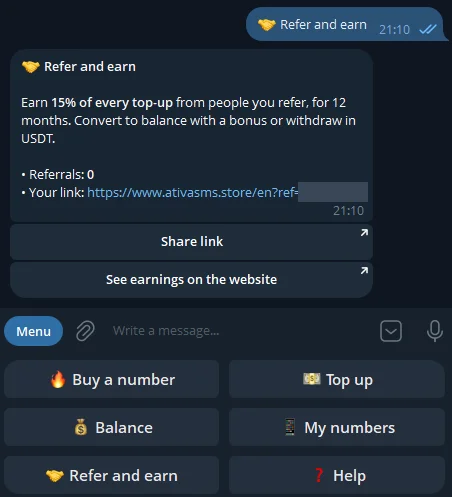 Refer and earn in the bot. Link code covered.
Commissions go to a reserve separate from your balance. You can convert them to balance right away with a 15% bonus, or withdraw USDT from $50 (dollar accounts) or R$100 (real accounts). The full rules are on the referral program page, and our affiliate program guide works through examples.
Privacy: what the bot sees and how to hide the code
Three things worth knowing before you connect:
- The bot only talks to you after you talk to it. Telegram's documentation says bots can't start conversations: a user has to message them first.
- A bot chat is not end-to-end encrypted. Telegram explains that regular "cloud chats" use server-client encryption; the extra end-to-end layer exists only in secret chats. The code is in the message text, just like in any SMS notification.
- The notification can show the code on your lock screen. That applies to Telegram and to any messaging app. If other people can see your phone, turn the preview off:
- iPhone: Settings → Notifications → tap Telegram → Show Previews → When Unlocked or Never.
- Android: Android Help calls this option "Hide sensitive content from notifications on your lock screen". The exact path varies by device, but it lives in the notification settings.
When not to use a temporary number
The bot makes the process faster, but the number is still temporary: it's yours for a short time, receives SMS only (no calls, no in-app codes) and is later used by other people. Don't use it for:
- banks, payment apps and government services, which need a number that is yours, with account recovery;
- your main email, because recovering the account later may depend on that number;
- your everyday WhatsApp, which may ask for a new code later, when the number is no longer yours.
The details are in our Terms of use.
Summary
- @ativa_sms_bot delivers the code in Telegram seconds after the SMS: 1.8 seconds in our test on October 12, 2026.
- You can buy, copy the code with one tap, close the number and cancel with a refund without leaving the chat. Only top-ups stay on the website, because of a Telegram rule.
- The Refer and earn menu pays 15% of your referrals' top-ups for 12 months.
- Turn off notification previews if other people can see your phone.
To get started, create your account and connect Telegram under Notices.
Sources
All accessed on October 14, 2026.
- Telegram, Bots FAQ: avoid more than one message per second in a single chat.
- Telegram, Telegram Bot Features: bots can't start conversations with users.
- Telegram, Bot API changelog: Bot API 7.11, October 31, 2024, with the copy text button (CopyTextButton).
- Telegram, Telegram Stars: digital goods and services paid exclusively in Stars.
- Telegram, FAQ: encryption of cloud chats and secret chats.
- Apple, Change notification settings on iPhone: Show Previews options.
- Google, Control notifications on Android: hide sensitive content on the lock screen.
- Ativa SMS: bot and notice rules (10-minute link, up to 3 Telegram accounts, five delivery attempts), bot screenshots from October 14, 2026, and delivery test from October 12, 2026.